Firmware & Software Updates
Software and Firmware Upgrades for BD/BX Series
Upgrades may be found
at Intech.Trimble.com under the specific products. Go to InTech now » |
Firmware and Software Upgrades for ADL Radio Modems
 |
|
| Filename |
Description |
Revision |
| ADL_FW.zip |
Firmware for ADL radios and modules |
5.14.0001 |
| ADL_FW_for_Spectra.zip |
Firmware for ADL Foundation and ADL RXO
modules embedded in Spectra Precision and
Ashtech GNSS receivers |
5.14.0001 |
| ADLCONF_Setup.zip |
ADLCONF configuration software for
all ADL and XDL radio modems |
4.22.0008 |
|
|
|
Instructions for upgrading ADL software and firmware:
Note: Upgrading firmware in an ADL radio does not affect the existing user configuration or
channel tables.
- Download the ADLCONF software upgrade zip file (ADLCONF_Setup.zip) and the appropriate version of ADL modem firmware zip file (see above) and extract the contents to a directory on your PC
- Because some PCs and/or networks prevent executable files from being downloaded, the software installer’s “exe” file extension is changed to “zzz.” To rename the file extension:
• Right-click the downloaded file: ADLCONF_Setup.zip
• Select the Rename option
• Change the file extension from "zzz" to “exe” for that version of setup (vx.xx.xxxx)
• Press Enter on your keyboard
- Press Enter again (or double-click ADLCONF_Setup.exe) to install the new version of ADLCONF
- There are two different versions of ADL modem firmware:
• For all ADL radios and most modules
• For ADL modules embedded in Spectra and Ashtech GNSS receivers
Download the appropriate firmware zip file and extract the contents to a directory on your PC
- Connect the radio to your PC, run ADLCONF and click File>Upgrade Modem Firmware
- Navigate to the download directory, highlight the appropriate *.bin firmware file and click Open
- Click OK on the Connect to ADL Radio dialog box
- If you see the following window, power-cycle the radio
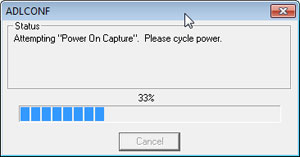
- Do not detach the radio from its programming cable (or turn off an embedded module’s host product) until the upgrade is complete (approximately 1 minute)
- To configure the attached ADL radio, power cycle the radio and click ADLCONF's Connect button
For information on the changes made to ADLCONF software click on ADLCONF_Release_Notes.pdf.
For information on the changes made to ADL firmware click on ADL_FW_Release_Notes.pdf.
Software/Firmware Upgrades for XDL Radio Modems
Instructions for upgrading XDL software and firmware:
Note: Upgrading firmware in an XDL radio does not affect the existing user configuration or
channel tables.
- Download the ADLCONF software upgrade zip file (ADLCONF_Setup.zip) and the appropriate version of XDL modem firmware zip file (see above) and extract the contents to a directory on your PC
- There are 2 versions of the XDL radio hardware. The first version will only work with a FW revision lower or equal to 2.10. The current version will only work with a FW revision higher or equal to 2.14. The current version of ADLCONF will automatically detect what FW version can be loaded in the XLD radio.
- Because some PCs and/or networks prevent executable files from being downloaded, the software installer’s “exe” file extension is changed to “zzz.” To rename the file extension:
• Right-click the downloaded file: ADLCONF_Setup.zip
• Select the Rename option
• Change the file extension from "zzz" to “exe” for that version of setup (vx.xx.xxxx)
• Press Enter on your keyboard
- Press Enter again (or double-click ADLCONF_Setup.exe) to install the new version of ADLCONF
- There are three different versions of XDL modem firmware:
• I/O firmware for XDL Rover 2 radios
• XDL modem firmware for XDL Rover 2 radios and XDL Micro modules
• XDL modem firmware for XDL Micro modules embedded in Spectra and Ashtech receivers
Download the appropriate firmware zip file and extract the contents to a directory on your PC
- Connect the radio to your PC, run ADLCONF and click File>Upgrade Modem Firmware
- Navigate to the download directory, highlight the appropriate *.bin firmware file and click Open.
Note: You may need to upgrade BOTH the I/O and modem firmware in an XDL Rover 2.
- Click OK on the Connect to ADL Radio dialog box
- If you see the following window, power-cycle the radio
- Do not detach the radio from its programming cable (or turn off an embedded module's host product) until the upgrade is complete (approximately 1 minute)
- To configure the attached XDL radio, power cycle the radio and click ADLCONF's Connect button
For information on the changes made to ADLCONF software click on ADLCONF_Release_Notes.pdf.
For information on the changes made to XDL modem firmware click on XDL_FW_Release_Notes.pdf.
Firmware and Software Upgrades for PDL/EDL
|
|
| Filename |
Description |
Revision |
| PDL2.40FW.zip |
PDL/EDL Operating Firmware |
2.40 |
| PDL2.42FW.zip |
PDL Operating Firmware |
2.42 |
| Note: if you are using any Trimble Survey equipment with PDL radios, you should use firmware version 2.42 on the PDL radio. |
| PDLCONF.zip |
PDL Configuration Software |
4.00 |
| EDLCONF.zip |
EDL Configuration Software |
1.21 |
|
|
|
Instructions for upgrading PDL firmware (also available on page 14 of the PDLCONF User Guide):
- Download the PDL/EDL operating firmware into the directory where PDLCONF/EDLCONF is
located. Note that some browsers may not properly download the firmware file. We recommend that you download the zipped version to avoid this problem.
- Connect your PDL to your computer using the programming cable and run PDLCONF/EDLCONF.
- After loading the configuration, click on the icon in the upper left-hand corner of the screen,
and select "Upgrade modem firmware."
- Specify the appropriate firmware revision in the dialog box and click OK. The firmware will be upgraded.
IMPORTANT NOTICE: PDLCONF revision 2.00/EDLCONF 1.00 or higher must already be installed in
order for you to upgrade firmware. If your PDL firmware version is 1.03 or earlier, please contact
Pacific Crest prior to attempting to upgrade your modem's firmware. To determine which firmware
version you are currently using, attach your radio to your PC, run PDLCONF and click on the
"Identification" tab.
For information concerning the PDL/EDL latest firmware
revision history, click on the Readme.txt file.
Firmware and Software Upgrades for RFM/TM32
|
|
| Filename |
Description |
Revision |
| RFMCONF |
RFM96W Modem Configuration Software |
1.71 |
| FREEPRG.EXE |
RFM96W Operating Firmware |
5.06 |
|
|
|
|
 |
Communications Products
Reference to order communications products parts and more.
Complete Parts List  |
| 
